All times are UTC + 8 hours


Post new topic Reply to topic  [ 56 posts ]  Go to page Previous  1, 2, 3, 4  Next
Author Message
PostPosted: Oct 21st, '14, 11:24 
Xtreme Contributor
Xtreme Contributor
User avatar

Joined: May 17th, '14, 07:21
Posts: 180
Gender: Male
Are you human?: YES
Location: Vancouver BC Canada
Can you show me more detail on your automatic feeder. I'm trying different mock-ups for mine and would love to see what you did.


Top
 Profile  
Reply with quote  
    Advertisement
 
PostPosted: Oct 21st, '14, 11:34 
Newbie
Newbie

Joined: Oct 16th, '14, 11:47
Posts: 44
Gender: Male
Are you human?: Almost...
Location: Northern Victoria
I'll take some photo's when i'm next home (which is in a week or so) but here's a quick run down.

20mm PVC shaft with an auger in it.
Auger attached to servo motor that rotates auger.

at around the middle of the shaft, there is a PVC T, which feeds upwards to a hopper (which is basically a series of reducing couplings, taking the PVC up to 100mm down-pipe. There is then a screw cap on the top.
At the end of the shaft there is a elbow that directs feed downwards, and through the tank roof.

The whole thing is mounted on some angle iron, and screwed to the top of the tank.

Super difficult to describe!!! haha.

Anyway, basically an auger with a hopper above it, that shifts feed through some pvc into the tank. The hopper holds around 1kg at the moment, but we'll probably extend this.


Top
 Profile  
Reply with quote  
PostPosted: Oct 21st, '14, 14:18 
A posting God
A posting God
User avatar

Joined: Dec 12th, '13, 18:34
Posts: 3846
Gender: Male
Are you human?: Yes
Location: Adelaide
How do you make the Rpi collect the information, I know with the arduino you wipe and upload the sketches, but how does it work with the rpi, do you go into raspbian or something and upload it all there, or is there a better way?


Top
 Profile  
Reply with quote  
PostPosted: Oct 21st, '14, 14:34 
Newbie
Newbie

Joined: Oct 16th, '14, 11:47
Posts: 44
Gender: Male
Are you human?: Almost...
Location: Northern Victoria
Colum Black-Byron wrote:
How do you make the Rpi collect the information, I know with the arduino you wipe and upload the sketches, but how does it work with the rpi, do you go into raspbian or something and upload it all there, or is there a better way?


Yeah everything is stored on the Pi (and backed up to dropbox). I have a SQL server installed on the Pi which allows me to store and manipulate databases.

Then the webserver on the Pi is used to serve up the information.

This is all under raspbian as you say.

What do you mean by upload the sketches?


Top
 Profile  
Reply with quote  
PostPosted: Oct 21st, '14, 18:44 
A posting God
A posting God
User avatar

Joined: Oct 16th, '11, 06:12
Posts: 2019
Gender: Male
Are you human?: 0110010110
Location: Brisbane, qld
For some bizarre reason the arduino team decided to call code files/programs sketches, instead of files / programs :dontknow:


Top
 Profile  
Reply with quote  
PostPosted: Oct 21st, '14, 19:21 
Newbie
Newbie

Joined: Oct 16th, '14, 11:47
Posts: 44
Gender: Male
Are you human?: Almost...
Location: Northern Victoria
How strange! Well in any case, everything is recoded in permanant storage on the Pi :)


Top
 Profile  
Reply with quote  
PostPosted: Oct 21st, '14, 22:20 
Legend Member
Legend Member

Joined: Aug 14th, '10, 03:55
Posts: 530
Gender: Male
Are you human?: Jar Head Clan
Location: Minnesota, USA
HEY nicbaz

Could you go into more details about your circuits? How is everything physically connected? Cameras, sensors, relays, what's stored 0n the card.... etc?

Maybe lay out a pseudo coded algorithm? Simple english statements maybe using line numbers, 10, 20, 30.....

Do you think the GPI0 will need to be expanded to another board like Beagle Bone or other types of processors?

Sorry for asking so many questions.

Just a 67 year "0ld Jar Head" with more questions than answers. Barely learning to crawl in the programming and controller world right now. :banghead:


Top
 Profile  
Reply with quote  
PostPosted: Oct 22nd, '14, 03:37 
Seriously, this cant be healthy.
User avatar

Joined: Feb 23rd, '07, 03:48
Posts: 6715
Location: Lyonville Victoria
Gender: Male
Are you human?: yes
Location: Lyonville
Keep asking because lots of us don't know this stuff.


Top
 Profile  
Reply with quote  
PostPosted: Oct 22nd, '14, 03:50 
Valued Contributor
Valued Contributor

Joined: Jun 25th, '13, 03:40
Posts: 76
Gender: Male
Are you human?: Today, YES
Location: Snohomish, WA
Bob H wrote:
...Just a 67 year "0ld Jar Head" with more questions than answers....


Semper fi!


Top
 Profile  
Reply with quote  
PostPosted: Oct 22nd, '14, 04:32 
Legend Member
Legend Member

Joined: Aug 14th, '10, 03:55
Posts: 530
Gender: Male
Are you human?: Jar Head Clan
Location: Minnesota, USA
OO-RAH!


Top
 Profile  
Reply with quote  
PostPosted: Oct 22nd, '14, 12:13 
Newbie
Newbie

Joined: Oct 16th, '14, 11:47
Posts: 44
Gender: Male
Are you human?: Almost...
Location: Northern Victoria
Bob H wrote:
HEY nicbaz

Could you go into more details about your circuits? How is everything physically connected? Cameras, sensors, relays, what's stored 0n the card.... etc?

Maybe lay out a pseudo coded algorithm? Simple english statements maybe using line numbers, 10, 20, 30.....

Do you think the GPI0 will need to be expanded to another board like Beagle Bone or other types of processors?

Sorry for asking so many questions.

Just a 67 year "0ld Jar Head" with more questions than answers. Barely learning to crawl in the programming and controller world right now. :banghead:


Well, this is fun isn't it! :)

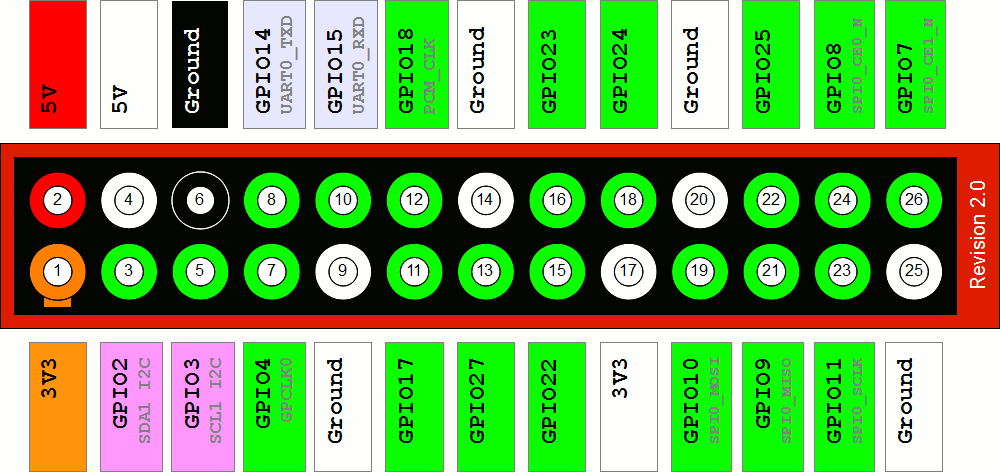
Basically a Raspberry Pi B has a 26 pin header (2 rows of 13 pins).
Some of these pins are GPIO (General Purpose Input Output) pins, some are power, some have specialised functions, and some are GPIO with specialised functions. Here is a picture of it: http://www.raspberrypi-spy.co.uk/wp-con ... sion-2.png

So the three types of component I have connected to my Pi are relays, servo motors, and temperature probes (nothing fancy).

To connect a relay, basically you give the relay 5V and ground, and connect it to one of the GPIO pins. Then you can run a command on the pi that energises the pin (powers it on), which then switches the relay - easy :).
Further to this, you can get relay modules that have several relay's on the one board.

To connect a servo motor, you again need to give the servo 5V and ground, as well as a GPIO pin. Then you basically send a signal over the GPIO pin that tells the servo motor to turn on. (The servo's have been modified to act as a motor, but still require the PWM signal https://learn.adafruit.com/modifying-se ... n/overview).

To connect a temp probe, you again have three connections, this time 3V3, ground and GPIO4 (pin 7), with a 4k7 resistor wired between GPIO4 and 3V3. https://www.cl.cam.ac.uk/projects/raspb ... mperature/

Now to the software...

I basically access and drive all the components through python, which is a reasonably simple programming language.
Basically, you import the GPIO library, then run the following command to do whatever you want.

Here is a program to switch a relay on and off:

Code:
#!/usr/bin/python
print "Content-Type: text/html\n\n"
import cgitb; cgitb.enable()

# This function requires 2 arguments, and will toggle the relevant gpio pin
# Usage ./gpio pinnumber on/off
# E.g   ./gpio 27 0
#   will turn pin 27 off

# Import library
import sys

if len(sys.argv) == 3:
    pin = int(sys.argv[1])
    switch = int(sys.argv[2])

if (switch < 0) or (switch > 1):
    print"Error, incorrect switch"

if (pin < 0) or (pin > 30):
    print"Error, incorrect pin"

# Import library
import RPi.GPIO as GPIO
# Setup gpio to use BCM numbering
GPIO.setmode(GPIO.BCM)

# Setup gpio pin as an output
GPIO.setup(pin, GPIO.OUT)

if switch == 1:
    GPIO.output(pin,True)
else:
    GPIO.output(pin,False)


# Sucessfully completed task
print"Sucessfully configured pin " + str(pin) + " as output " + str(switch)


which is called like this: sudo python /home/pi/Automation/gpio_out.py 22 1

which powers on GPIO22

and the following command turns it off: sudo python /home/pi/Automation/gpio_out.py 22 0

Regarding a BeagleBoard, my understanding that this is an alternative to the Raspberry Pi, rather than an expansion.
Think of the Raspberry Pi like a little computer, which it is.

If you run out of pins on a Raspberry Pi you can buy expansion boards that give you more GPIO pins.

Anything else I can help with, or anything I missed?


Top
 Profile  
Reply with quote  
PostPosted: Oct 22nd, '14, 16:26 
Almost divorced
Almost divorced
User avatar

Joined: Aug 9th, '09, 13:14
Posts: 1357
Gender: Male
Are you human?: I'll be baaaack!
Location: SOR, Perth, WA
Hi nicbaz,

I've got some plans to employ a RPi or two when I get back to my system (I'm away for a protracted period, now)...

With your feed amounts, instead of using a plethora of "if" statements, I'd use a function like:
feed_multiplier = tempTank * 0.05 + addSomeIfYouLike;

Do you have a battery module in the RPi? I've seen some conjecture how long they actually last?

What components are you using on your web pages for the charts? (Freeware or licenced?)


Top
 Profile  
Reply with quote  
PostPosted: Oct 22nd, '14, 16:37 
Newbie
Newbie

Joined: Oct 16th, '14, 11:47
Posts: 44
Gender: Male
Are you human?: Almost...
Location: Northern Victoria
bunson wrote:
Hi nicbaz,

I've got some plans to employ a RPi or two when I get back to my system (I'm away for a protracted period, now)...

With your feed amounts, instead of using a plethora of "if" statements, I'd use a function like:
feed_multiplier = tempTank * 0.05 + addSomeIfYouLike;

Do you have a battery module in the RPi? I've seen some conjecture how long they actually last?

What components are you using on your web pages for the charts? (Freeware or licenced?)


Sounds good, lots of fun to implement!

I know, it would be better that way, but this is clear and allows for easy changes on the fly.
Unfortunately optimal feeding rate does not seem to be linear, so it would not be a simple y = mx + c equation to determine the feed rate (though the implementation above is linear).

Nope, no battery module, it gets the time from its internet connection.

The charts are freeware from google. https://developers.google.com/chart/int ... cs/gallery


Top
 Profile  
Reply with quote  
PostPosted: Oct 22nd, '14, 16:38 
Legend Member
Legend Member
User avatar

Joined: Apr 18th, '13, 20:16
Posts: 862
Gender: Male
Are you human?: yes
Location: SEQ Australia
I've been trying hard not to get into audrino or Pi since it's down the list of prioritised hobbies.
Getting tempted to knock it up a few places on my list now...


Top
 Profile  
Reply with quote  
PostPosted: Oct 22nd, '14, 17:08 
Seriously, this cant be healthy.
User avatar

Joined: Mar 26th, '10, 20:46
Posts: 5404
Location: South Australia
Gender: Male
Are you human?: Yep
Location: South Australia
Fish work out how to press a lever within a few hours, so if you make the feeder feed only when there's demand, it allows for their fussy habits. it's still easy enough to keep the control you have, you just add an LED to let them know feed is available, and turn it off when they have had their ration for the day.


Top
 Profile  
Reply with quote  
Display posts from previous:  Sort by  
Post new topic Reply to topic  [ 56 posts ]  Go to page Previous  1, 2, 3, 4  Next

All times are UTC + 8 hours


You cannot post new topics in this forum
You cannot reply to topics in this forum
You cannot edit your posts in this forum
You cannot delete your posts in this forum
You cannot post attachments in this forum

Search for:
Jump to:  

Powered by phpBB® Forum Software © phpBB Group
Portal by phpBB3 Portal © phpBB Türkiye
[ Time : 0.046s | 16 Queries | GZIP : Off ]