⚠️ This forum has been restored as a read-only archive so the knowledge shared by the community over many years remains available. New registrations and posting are disabled.

All times are UTC + 8 hours


Post new topic Reply to topic  [ 14 posts ] 
Author Message
 Post subject: Computer Switch
PostPosted: Jul 10th, '12, 19:00 
Legend Member
Legend Member

Joined: Sep 4th, '11, 04:33
Posts: 858
Gender: Male
Are you human?: Extraterrestrial
Location: Planet Earth 31, 57 S, 115, 52 E
Guys,

The PC "ON" button (which can also be an off button if held down long enough) - Does the wiring for that switch have to pass through the ferite ring that is usually located in the front panel of a PC case?

I think the ferite ring is there to reduce EMI.

I have made a remote switch so that I can turn on the PC from far away and I am running the wiring from the mother board out the back of the computer so it is not passing through the ferite ring. Would it be okay to do this?

Also is the ferite ring really needed?


Top
 Profile  
Reply with quote  
    Advertisement
 
 Post subject: Re: Computer Switch
PostPosted: Jul 10th, '12, 19:12 
Newbie
Newbie

Joined: Jul 8th, '12, 13:19
Posts: 48
Location: nice warm tasie
Gender: Male
Are you human?: yes i think so
Location: australia tasmania latrobe
it will work

no u dont need it but with out it u can pick up EM and if that happens the pc may think u have pushed the button
so if u can not get on for it just keep the wires away form electric divises any thing that makes a EM fild like transformers boxs motors and such


Top
 Profile  
Reply with quote  
 Post subject: Re: Computer Switch
PostPosted: Jul 10th, '12, 19:20 
A posting God
A posting God
User avatar

Joined: Oct 16th, '11, 06:12
Posts: 2019
Gender: Male
Are you human?: 0110010110
Location: Brisbane, qld
Yep, plenty of computers don't even have the ferrite choke. If not already done twist the wires together to reduce the common mode susceptibility.

Sent from my U8510 using Tapatalk 2


Top
 Profile  
Reply with quote  
 Post subject: Re: Computer Switch
PostPosted: Jul 10th, '12, 19:57 
Legend Member
Legend Member

Joined: Sep 4th, '11, 04:33
Posts: 858
Gender: Male
Are you human?: Extraterrestrial
Location: Planet Earth 31, 57 S, 115, 52 E
Thank you for your help guys.


Top
 Profile  
Reply with quote  
 Post subject: Re: Computer Switch
PostPosted: Jul 10th, '12, 21:01 
Legend Member
Legend Member

Joined: Aug 14th, '10, 03:55
Posts: 530
Gender: Male
Are you human?: Jar Head Clan
Location: Minnesota, USA
:wave1: Just curious about your remote switch project.

Could you discuss it a little more?

Like how far away, how it's going to get turned on eventually, and what is your final project, or role for the PC?

Neat idea.


Top
 Profile  
Reply with quote  
 Post subject: Re: Computer Switch
PostPosted: Jul 10th, '12, 23:10 
Legend Member
Legend Member

Joined: Sep 4th, '11, 04:33
Posts: 858
Gender: Male
Are you human?: Extraterrestrial
Location: Planet Earth 31, 57 S, 115, 52 E
Hi Bob H,

Well the project is not so much directly related to Aquaponics however since I have made the switch for my Dad's computer it is indirectly related because he loves to read about Aquaponics online.

Having a remote switch allows for the main computer box to be stored away beneath the desk thus creating more desk space. The new switch is on the desk for easy access. Also I prefer all the PC connections to be easily accessible in which case the "ON" switch is located right at the back - but now the "ON" button is on the desk right near the keyboard and mouse. My intention in the future is to have a central computer hub that can be turned on by remote.

The switch I have used is a momentary contact switch which is needed for a PC "ON" switch. It is wired up to the motherboard with a 3 m cable. In the future the switch could be made wireless with the application of some more electronics.


Top
 Profile  
Reply with quote  
 Post subject: Re: Computer Switch
PostPosted: Jul 11th, '12, 08:25 
Legend Member
Legend Member
User avatar

Joined: Jun 21st, '12, 06:51
Posts: 545
Gender: Male
Are you human?: YES
Location: Australia, WA, Beldon
An easier (but way less fun) way is to buy a remote power switch -- you can get these from Bunnings. They are a 27MHz remote transmitter, that controls a 240 V power socket.

Although the box doesn't say it, the standby power of this device is under half a watt, they're great for pressing a button and powering up your mission control :)

You can also use them to power up your entertainment system (TV, stereo, DVD etc).


Top
 Profile  
Reply with quote  
 Post subject: Re: Computer Switch
PostPosted: Jul 11th, '12, 10:26 
Legend Member
Legend Member

Joined: Sep 4th, '11, 04:33
Posts: 858
Gender: Male
Are you human?: Extraterrestrial
Location: Planet Earth 31, 57 S, 115, 52 E
Hi Nebbian,

The device you mention might work but I'm not sure (I have never used one) if a PC is powered down, turning the mains switch on will not power up a PC. You would still need to press the "ON" button on the PC to power it up. That is why I have wired this switch up to the mother board. In my case the mains switch stays on and the new switch is a substitute for the power up button on the PC.


Last edited by MacGyver on Jul 11th, '12, 11:14, edited 1 time in total.

Top
 Profile  
Reply with quote  
 Post subject: Re: Computer Switch
PostPosted: Jul 11th, '12, 11:13 
A posting God
A posting God
User avatar

Joined: Oct 16th, '11, 06:12
Posts: 2019
Gender: Male
Are you human?: 0110010110
Location: Brisbane, qld
There should be a setting in the BIOS that can set the computer to power up on "Power Resume"


Top
 Profile  
Reply with quote  
 Post subject: Re: Computer Switch
PostPosted: Jul 11th, '12, 11:16 
Legend Member
Legend Member

Joined: Sep 4th, '11, 04:33
Posts: 858
Gender: Male
Are you human?: Extraterrestrial
Location: Planet Earth 31, 57 S, 115, 52 E
Oh okay thanks SuperVeg I was not aware of that. In that case the device Nebbian mentioned could be used.


Top
 Profile  
Reply with quote  
 Post subject: Re: Computer Switch
PostPosted: Jul 11th, '12, 11:26 
Bordering on Legend
Bordering on Legend
User avatar

Joined: Jan 18th, '11, 08:29
Posts: 481
Images: 0
Location: Western NC
Gender: Male
Are you human?: Unknown Cyborg
Location: North Carolina
You typically don't want to unplug a PC, you'll drain the BIOS battery over time and have to buy a new one.


Top
 Profile  
Reply with quote  
 Post subject: Re: Computer Switch
PostPosted: Jul 11th, '12, 12:34 
Legend Member
Legend Member

Joined: Sep 4th, '11, 04:33
Posts: 858
Gender: Male
Are you human?: Extraterrestrial
Location: Planet Earth 31, 57 S, 115, 52 E
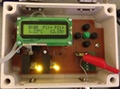
Here is a picture of the switch that I made. As stated above it is a momentary switch, it is wired directly to the motherboard and the mains power remains on.

Attachment:
Switch1.jpg
Switch1.jpg [ 52.46 KiB | Viewed 5322 times ]


Top
 Profile  
Reply with quote  
 Post subject: Re: Computer Switch
PostPosted: Jul 11th, '12, 13:24 
Legend Member
Legend Member

Joined: Sep 4th, '11, 04:33
Posts: 858
Gender: Male
Are you human?: Extraterrestrial
Location: Planet Earth 31, 57 S, 115, 52 E
Thank you everyone for your input :thumbright:


Top
 Profile  
Reply with quote  
 Post subject: Re: Computer Switch
PostPosted: Aug 2nd, '12, 01:26 
Seriously, this cant be healthy.
User avatar

Joined: Mar 26th, '10, 20:46
Posts: 5404
Location: South Australia
Gender: Male
Are you human?: Yep
Location: South Australia
SuperVeg wrote:
There should be a setting in the BIOS that can set the computer to power up on "Power Resume"


So that's what that means.

Thanks


Top
 Profile  
Reply with quote  
Display posts from previous:  Sort by  
Post new topic Reply to topic  [ 14 posts ] 

All times are UTC + 8 hours


You cannot post new topics in this forum
You cannot reply to topics in this forum
You cannot edit your posts in this forum
You cannot delete your posts in this forum
You cannot post attachments in this forum

Search for:
Jump to:  
cron

Powered by phpBB® Forum Software © phpBB Group
Portal by phpBB3 Portal © phpBB Türkiye
[ Time : 0.036s | 15 Queries | GZIP : Off ]