All times are UTC + 8 hours


Post new topic Reply to topic  [ 562 posts ]  Go to page Previous  1 ... 34, 35, 36, 37, 38  Next
Author Message
PostPosted: Apr 28th, '14, 15:23 
Seriously, this cant be healthy.
User avatar

Joined: Mar 26th, '10, 20:46
Posts: 5404
Location: South Australia
Gender: Male
Are you human?: Yep
Location: South Australia
tigger03 wrote:
After looking at schematics for programming circuits online for a while, I'm thinking that perhaps the part with the stereo socket and 10K resistor is for programming and I actually won't need to build a separate circuit, just attach the cable I made? Is that the case?

Thank you very much!


That's correct.

top four pins are 5v 0v serial in (input to program the chip) and serial out (a way to have information sent back out to a computer)

Stereo plug goes into the socket, and the other end of the cable is a USB plug to you computer. You use the programmer software that you get for free on the PICAXE site.

Have a look in the manual that shows how to use different components and add the resistor and LED on your breadboard to one of the pins that is labelled "out" (also in the manual) The code to work with LEDs should be in the manual where it tells you how to connect an LED.


You write the code in the programmer software, then (I think) the top right menu option uploads the program to the chip and it should start running.

Read those manuals


Top
 Profile  
Reply with quote  
    Advertisement
 
PostPosted: Apr 28th, '14, 15:33 
Seriously, this cant be healthy.
User avatar

Joined: Mar 26th, '10, 20:46
Posts: 5404
Location: South Australia
Gender: Male
Are you human?: Yep
Location: South Australia
tigger03 wrote:
Sorry to add another question, but how many feeds per day would you recommend?

Also, do I need to modify the code before testing the LED function?


I went with lots (30 or so) of little feeds so I could see them do it. Mine had a light that came on only when feed was available, and I wanted to do a bit of research as to how long it would take for them to learn that if the light wasn't on the feeder didn't work (3 days or so).

I have no idea how many feeds is ideal. It probably depends on your fish species. I suspect fewer, larger feeds per day means everyone gets a fair share, but I only had a few fish, so I'm happy for a greedy one to get bigger and onto the plate faster than the others. It might be possible for a fish to guard the feeder and take all the little feeds before anyone else gets them.

Also I have no idea if your cable will work. But good luck.


Top
 Profile  
Reply with quote  
PostPosted: Apr 28th, '14, 15:54 
Seriously, this cant be healthy.
User avatar

Joined: Mar 26th, '10, 20:46
Posts: 5404
Location: South Australia
Gender: Male
Are you human?: Yep
Location: South Australia
tigger03 wrote:
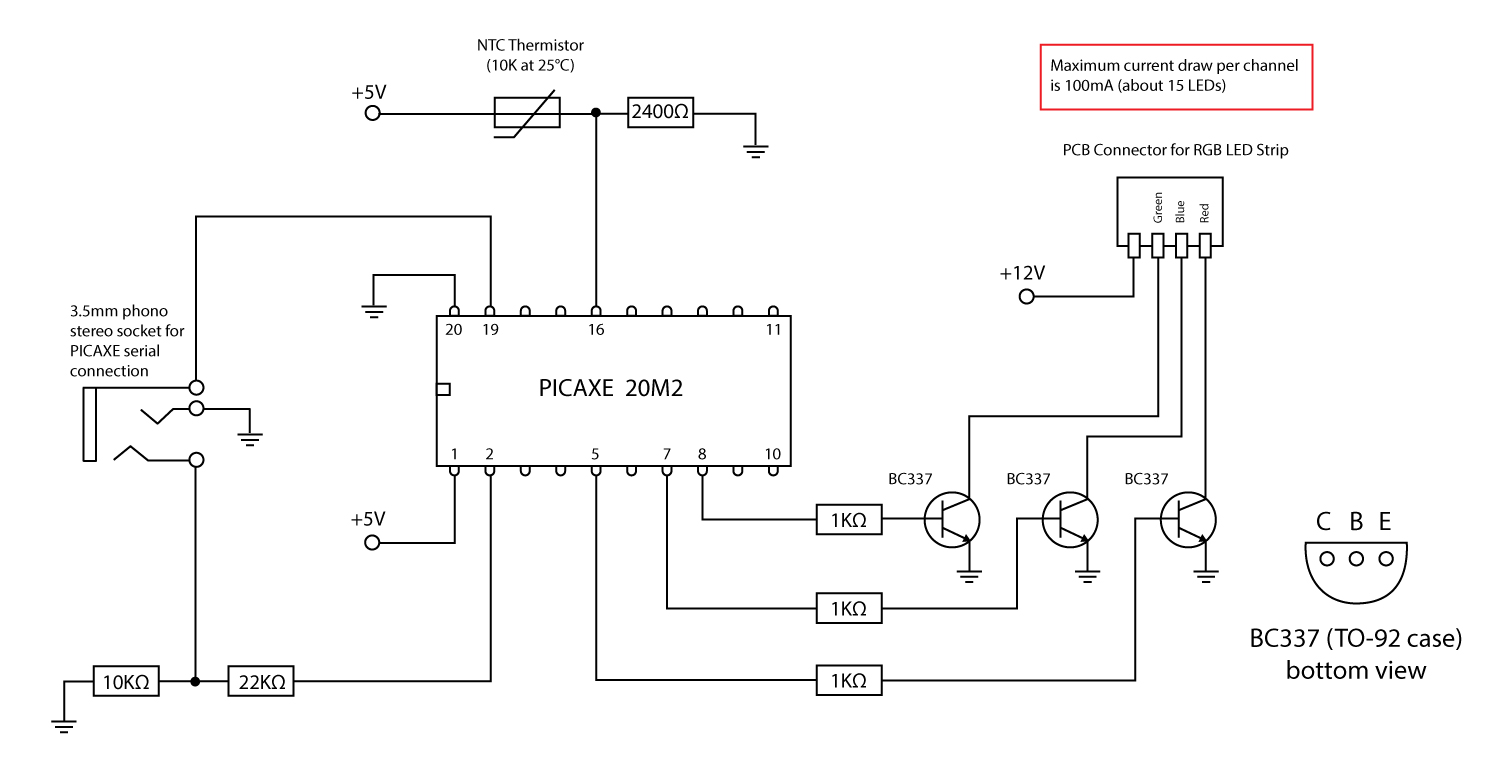
I think I will actually need to make mine slightly different to work with the serial cable I made, which has three wires small enough to go directly into the board at it's end. I found the attached circuit diagrams all had in common (although I couldn't find one specifically for the 20m2) that Wire 2 is connected to Serial In with a 22K and 10K resistor along the way and wanted to see if there was a particular reason you used a 10K and 1K resistor. Also, is the function of the middle section to make the 12 V battery work with the 5V requirement? My understanding of circuit elements is very fuzzy
:dontknow:
Thanks again!

Update: I found this one for the 20m2 that doesnt go into quite as much detail but also shows a 10K and 22K resistor http://thedialist.files.wordpress.com/2 ... oller1.jpg

Do you have any suggestions?


Well clearly, your understanding is better than my diagram :)

The serial in and out connections to the stereo socket are all wrong on my circuit.

Use the diagram in the PICAXE manual "Getting started" Section 1, page 31.


And yes, the section in the middle connected to the top two pins is about regulating the voltage to 5v. It also has a plug for the power, an on/off switch, an LED + resistor to show it's on, and a capacitor that I think is there to clean up the input voltage and make it steady (perhaps there is a spike or something when the motor kicks in). Sorry I cant be more specific, but someone in this thread told me to put it there I think.


Top
 Profile  
Reply with quote  
PostPosted: Apr 28th, '14, 15:59 
Seriously, this cant be healthy.
User avatar

Joined: Mar 26th, '10, 20:46
Posts: 5404
Location: South Australia
Gender: Male
Are you human?: Yep
Location: South Australia
Here's a potential problem I hadn't even thought of until just now.

The day after tomorrow I go away on trip to the east coast to stay on an island for a few day. I forgot all about it (not the trip, just the Internet access). I have no idea if I'll have Internet access.


Top
 Profile  
Reply with quote  
PostPosted: Apr 28th, '14, 16:03 
Seriously, this cant be healthy.
User avatar

Joined: Mar 26th, '10, 20:46
Posts: 5404
Location: South Australia
Gender: Male
Are you human?: Yep
Location: South Australia
tigger03 wrote:
tigger03 wrote:
Hello,

I got the error that the symbol "time" was not defined; do you know how to correct this?


Never mind solved that issue :)


Cool, does that mean you have a chip running and can program it?

Is there any reason you cant display your project with it on a breadboard?

I'm about to leave for the night and wont be back for another 18 hours or so, but I'll try to be online as much as I can tomorrow.


Top
 Profile  
Reply with quote  
PostPosted: Apr 28th, '14, 16:06 
Seriously, this cant be healthy.
User avatar

Joined: Mar 26th, '10, 20:46
Posts: 5404
Location: South Australia
Gender: Male
Are you human?: Yep
Location: South Australia
Or I might be back online in 7 hours. Depending on how much fun I'm having.


Top
 Profile  
Reply with quote  
PostPosted: Apr 28th, '14, 19:43 
Newbie
Newbie

Joined: Apr 21st, '14, 11:25
Posts: 23
Gender: Male
Are you human?: YES
Location: Georgia United States
Hello,

Thank you once again for your help!

I set up a serial circuit attached the wires of my cable into it based on the PICAXE manual but when I was trying to test it have run into the issue that I need a serial --> USB converter as my computer does not have a serial port, and the cable I used was made from a serial connector, before I can program it. I will attach a picture of my serial circuit here however.

Hope you enjoy your trip! Would it be possible for you to chat over skype today? I am trying to get this project done today (or as much as possible as I know that's probably not feasible.) While waiting for the serial adapter, I am trying to make sure I am ready to build the rest of the circuit and lay everything out. I understand the schematic for the motor drive and have found the layout of the Power MOSFET in the Interfacing Circuits manual helpful but have researched a lot and am not sure of how to put the FET and everything on a breadboard and don't want to mess it up and damage the PICAXE with the motor. Could you possibly show me how you transferred that section of your schematic to the breadboard?


Top
 Profile  
Reply with quote  
PostPosted: Apr 29th, '14, 01:08 
Seriously, this cant be healthy.
User avatar

Joined: Mar 26th, '10, 20:46
Posts: 5404
Location: South Australia
Gender: Male
Are you human?: Yep
Location: South Australia
It's probable worth noting at this obvious stage that the quality of help I can offer leaves a lot to be desired.

The fact that you have already found a serious fault in my circuit diagram should lead lead you to the conclusion that you should trust the PICAXE manuals rather than anything I say :)


Top
 Profile  
Reply with quote  
PostPosted: Apr 29th, '14, 02:05 
Seriously, this cant be healthy.
User avatar

Joined: Mar 26th, '10, 20:46
Posts: 5404
Location: South Australia
Gender: Male
Are you human?: Yep
Location: South Australia
tigger03 wrote:
Hello,

Thank you once again for your help!

I set up a serial circuit attached the wires of my cable into it based on the PICAXE manual but when I was trying to test it have run into the issue that I need a serial --> USB converter as my computer does not have a serial port, and the cable I used was made from a serial connector, before I can program it. I will attach a picture of my serial circuit here however.

Hope you enjoy your trip! Would it be possible for you to chat over skype today? I am trying to get this project done today (or as much as possible as I know that's probably not feasible.) While waiting for the serial adapter, I am trying to make sure I am ready to build the rest of the circuit and lay everything out. I understand the schematic for the motor drive and have found the layout of the Power MOSFET in the Interfacing Circuits manual helpful but have researched a lot and am not sure of how to put the FET and everything on a breadboard and don't want to mess it up and damage the PICAXE with the motor. Could you possibly show me how you transferred that section of your schematic to the breadboard?


I'll "private message" you a skype account so we can chat tomorrow.

If you eventually make something that works, and if you add any extra functionality (probes for temperature, pH or whatever) are you happy to document your code and circuit diagram here so others may benefit?

It would be cool if you could redraw the circuit diagram without the errors you found, and whatever else you add so that others may benefit.

And at some stage down the track, it would be nice if you posted the code you eventually use to make everything work.


Top
 Profile  
Reply with quote  
PostPosted: Apr 29th, '14, 02:13 
Seriously, this cant be healthy.
User avatar

Joined: Mar 26th, '10, 20:46
Posts: 5404
Location: South Australia
Gender: Male
Are you human?: Yep
Location: South Australia
opps


Top
 Profile  
Reply with quote  
PostPosted: Apr 29th, '14, 04:26 
Newbie
Newbie

Joined: Apr 21st, '14, 11:25
Posts: 23
Gender: Male
Are you human?: YES
Location: Georgia United States
I will definitely post everything from my project once I finish, although I am not sure if I will end up with anything of use to people :)


Top
 Profile  
Reply with quote  
PostPosted: May 2nd, '14, 22:30 
Seriously, this cant be healthy.
User avatar

Joined: Mar 26th, '10, 20:46
Posts: 5404
Location: South Australia
Gender: Male
Are you human?: Yep
Location: South Australia
I spent a few hours chatting to tigger03 who turns out to be a totally worthwhile, and decent human. Generally speaking, definitely someone worth helping with any projects or questions about anything ever.

I personally endorse tigger03 :)


Top
 Profile  
Reply with quote  
PostPosted: May 3rd, '14, 11:52 
Newbie
Newbie

Joined: Apr 21st, '14, 11:25
Posts: 23
Gender: Male
Are you human?: YES
Location: Georgia United States
Thank you very much Bullwinklell, and it was very kind of you to take the time out of your day to answer my questions and share your knowledge. I was so excited when I programmed the circuit and it worked! Everybody at school loved the flashing lights system; it was a lot of fun to present and I recommended your blog to my classmates. Thanks again!

To everyone else on this forum, I would recommend correspondence with Bullwinklell as he went above and beyond to help me and enabled me to build a much more advanced microcontroller system than I ever would have thought I could as basically an absolute beginner.

Just attached my circuit - at first, the yellow bottom light is lit showing feeds are allowed. Then the fish presses the lever, the motor works and that light turns off for a while to show it can't feed twice in a row. The white square (it turns out red when its on but itsnt in the picture) light starts flashing to indicate that it has fed once if that is the only time it has fed so far (white square shows number of feeds per day). If the fish tries again while the right yellow light is not on and its not allowed to feed, the top yellow light will blink a number of times that indicates its total number of illegal feeds per day. The two red lights blink to indicate the number of feeds allowed per day and feed size, which the person in charge can adjust with the little boxes or potentiometers.


Top
 Profile  
Reply with quote  
PostPosted: May 6th, '14, 23:19 
Seriously, this cant be healthy.
User avatar

Joined: Mar 26th, '10, 20:46
Posts: 5404
Location: South Australia
Gender: Male
Are you human?: Yep
Location: South Australia
If you attach a circuit diagram as anything other than an image, you need to put it into a zip file. The forum only allows a few different file extensions for it's own protection.


Top
 Profile  
Reply with quote  
PostPosted: May 9th, '14, 06:33 
Newbie
Newbie

Joined: Apr 21st, '14, 11:25
Posts: 23
Gender: Male
Are you human?: YES
Location: Georgia United States
Hello,

Thanks for the information! I thought I attached an image last time but very well may have been confused :) I am now (hopefully) attaching pictures of a circuit diagram and my actual circuit on the breadboard.


Top
 Profile  
Reply with quote  
Display posts from previous:  Sort by  
Post new topic Reply to topic  [ 562 posts ]  Go to page Previous  1 ... 34, 35, 36, 37, 38  Next

All times are UTC + 8 hours


You cannot post new topics in this forum
You cannot reply to topics in this forum
You cannot edit your posts in this forum
You cannot delete your posts in this forum
You cannot post attachments in this forum

Search for:
Jump to:  

Powered by phpBB® Forum Software © phpBB Group
Portal by phpBB3 Portal © phpBB Türkiye
[ Time : 0.061s | 13 Queries | GZIP : Off ]